

TL;DR:
HTTP/3 is the third major version of HTTP, running over QUIC on UDP, and browsers covering 93.7% of global usage already support it. Expect steadier performance for visitors on mobile or lossy networks, and very little change on fast wired connections. If most of your traffic is mobile, enabling it is worth the effort: a CDN handles it at the edge, and self-managed stacks need nginx 1.25 or later.
HTTP/3 is the newest version of the protocol your browser already uses for every page it loads. What it changes is how fast the web feels on real connections—patchy mobile data, hotel Wi-Fi, the four minutes your train spends in a tunnel. On the fiber line your speed test runs over, you may never notice it at all.
So here’s what HTTP/3 is, what it changed under the hood, whether it’s genuinely faster, and how to serve it on your own site.
Test Nitropack yourself


By submitting, you agree to the WP Engine Terms of Service and acknowledge the Privacy Policy.
What is HTTP/3?
HTTP/3 is the third major version of the Hypertext Transfer Protocol, published as RFC 9114 in June 2022, and it runs over a transport protocol called QUIC.
TCP carried every earlier version of HTTP. HTTP/3 hands that job to QUIC, which runs on UDP. The full chain is HTTP/3 over QUIC over UDP: HTTP/3 always goes through QUIC, and it never addresses UDP directly.
HTTP itself stayed the same. Methods, status codes, headers, cookies, caching rules—every semantic your site depends on behaves exactly as before. A GET is still a GET. Nothing in your theme, your plugins, or your API calls needs rewriting because a visitor arrived over h3.
Is HTTP/3 the same as QUIC?
No. HTTP/3 is the application protocol that carries your pages, and QUIC is the transport underneath it that moves the packets. QUIC can carry other protocols too—DNS over QUIC is already specified—so the two names describe two different layers of the stack.
Swapping out the transport sounds like housekeeping. It produces four changes you can actually observe.
What is new in HTTP/3 compared to HTTP/2?
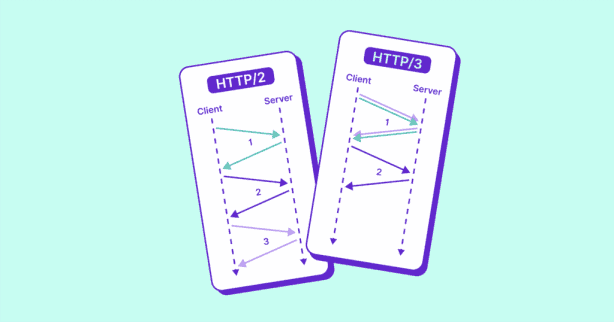
The core change is the transport: HTTP/3 replaces TCP with QUIC over UDP, so one lost packet stops stalling every stream on the connection.
- QUIC tracks delivery per stream, so one dropped packet delays only the resource it belonged to, and the other twenty keep arriving. HTTP/2 fixed this at the application layer, and TCP kept undoing the fix by delivering bytes in the order it sent them.
- TLS 1.3 is mandatory in QUIC, and the transport and cryptographic handshakes complete together. On a fresh connection, that typically saves one round trip, compared with TCP setup followed by a separate TLS handshake.
- QUIC identifies a session by a connection ID, so a phone that switches from Wi-Fi to cellular keeps the same connection and everything it has already negotiated.
- A client that has connected before can send application data with its first packet, ahead of the handshake finishing. This 0-RTT resumption covers safe requests that leave server state alone, and TLS 1.3 offers early data on HTTP/2 as well, so credit this one to TLS.
- QPACK replaces HPACK for header compression, designed so that compression state never reintroduces blocking across the streams QUIC delivers independently.
| Dimension | HTTP/2 | HTTP/3 |
| Transport | TCP | QUIC over UDP |
| Head-of-line blocking | Present at the transport layer | Removed at the transport layer |
| Encryption | Usually TLS over TCP for web traffic | TLS 1.3, required by QUIC |
| Handshake | TCP setup, then TLS | Combined, typically one round trip fewer |
| Connection migration | No | Yes, via connection ID |
| Header compression | HPACK | QPACK |
| 0-RTT resumption | Available through TLS 1.3 early data | Part of QUIC connection resumption |
Two of those rows carry most of the weight. Per-stream delivery is what keeps a lossy connection moving, and the combined handshake is what gets a first visit started sooner. Both pay off more the worse your visitor’s network is.
Why does HTTP/3 matter for your website?
HTTP/3 is most useful on lossy, high-latency, or changing networks—the conditions mobile visitors meet more often than not. On TCP, one lost packet holds up everything behind it, while on HTTP/3, only the file that packet belonged to has to wait.
Here’s what that means in real life:
- Someone on patchy 4G loses a packet, and only the image it belonged to pauses. Your text and the rest of the page carry on loading.
- Someone who has visited before reuses what their browser already negotiated with your server, so their first request goes out sooner.
- Someone who walks out of the house mid-load switches from Wi-Fi to cellular and keeps the same connection, where migration is supported.
Those same mechanics drive your Core Web Vitals and TTFB numbers.

On a fast, stable wired connection, your visitors will barely register the change. Server response time and page weight matter far more there than the protocol version does. HTTP/3 improves the experience for everyone having a bad network day.
The practical route to serving it is a CDN that handles HTTP/3 at the edge, giving every visitor the newer protocol without a change to your own server. NitroPack’s CDN works this way.
Is HTTP/3 faster than HTTP/2?
HTTP/3 is faster than HTTP/2 on lossy or high-latency connections, and roughly even with it on clean wired links. The answer for your site depends on the networks your visitors are actually on, and on how well QUIC is implemented at both ends of the connection.
DebugBear has field data on one site where visitors served over HTTP/3 recorded LCP scores 13.8% better than visitors on HTTP/2—1.44 seconds against 1.67. That is real-user monitoring from a single website, so read it as directional evidence about the size of the effect, and expect your own numbers to differ.
DebugBear is more cautious about the general case, framing the benefit as situational—strongest for mobile, high-latency, and returning visitors, and minimal on fast, stable connections. On a connection that is already fast and stable, your server response time, congestion control, and total page weight decide the outcome long before the protocol version does.
The gains concentrate on visitors dealing with packet loss, long round trips, or a network that changes mid-session, and mobile traffic collects all three. So the question worth answering is what share of your own traffic looks like that. Your field data in Core Web Vitals reporting, split by device and country, tells you more about whether HTTP/3 will help than any benchmark can.
Whether those visitors can use HTTP/3 at all comes down to their browser and your server.
Which browsers and servers support HTTP/3?
Every current major browser supports HTTP/3 by default, covering 93.7% of tracked global usage. Chrome and Edge have shipped it since version 87, Firefox since 88, and Safari since Safari 16.
Server support is where the work usually is. LiteSpeed turns QUIC on by default from version 5.2, needing HTTPS and UDP port 443 open. Caddy enables h3 in its default protocol set. nginx has offered HTTP/3 since 1.25.0 through a module that its own documentation still calls experimental, and it needs a QUIC listener configured explicitly. A CDN that serves HTTP/3 at the edge skips all of that, since your origin keeps talking whatever it already speaks.
One quirk explains a lot of confusing dev tools sessions. A browser that has never met your site may open with HTTP/2 or HTTP/1.1 and learn about HTTP/3 from your Alt-Svc response header, then open a separate QUIC connection for later requests. DNS HTTPS and SVCB records can tell it in advance instead. So a first page load showing h2 is normal.
How can you check if a site uses HTTP/3?
To check whether a site uses HTTP/3, open your browser’s Network tab and look for h3 in the Protocol column.
- Open dev tools and switch to the Network tab.

- Right-click any column header and enable the Protocol column.
- Reload the page and read that column. h3 means HTTP/3, h2 means HTTP/2.
A first load showing h2 needs one more reload, because the browser has to learn HTTP/3 is available before it will use it.
From the command line, curl –http3-only -I https://example.com succeeds only over HTTP/3 and never falls back to an earlier version. For that to mean anything, your curl build must include HTTP/3 support: run curl –version and look for HTTP3 in the Features line. If you would rather not install anything, http3check.net reports HTTP/3 and QUIC support for any URL you give it.
How do you enable HTTP/3 on your site?
The simplest way to enable HTTP/3 is a CDN or host that serves it at the edge, which needs no changes to your own server.
Running your own stack means working through the configuration yourself. On nginx:
- Run 1.25.0 or later, built with the HTTP/3 module.
- Add a QUIC listener alongside your existing TLS listener.
- Point it at a valid TLS certificate.
- Advertise h3 with an Alt-Svc response header.
- Open UDP port 443 at the firewall.
LiteSpeed and Caddy shorten that list, since both enable HTTP/3 by default once HTTPS and UDP 443 are in place.
The other path skips your server entirely. NitroPack serves your site over HTTP/3 through its Cloudflare-powered CDN, included in every plan with no manual setup or origin configuration.
For most site owners, HTTP/3 is worth turning on for steadier mobile performance, and a CDN is the least-effort route there.
FAQ
Is HTTP/3 released or still experimental?
HTTP/3 has been a Proposed Standard since June 2022, and servers like LiteSpeed and Caddy enable it by default, so it is production-ready. Individual implementations vary in maturity, which is why nginx still labels its own HTTP/3 module experimental.
Is HTTP/3 secure?
Yes. QUIC requires TLS 1.3, so every HTTP/3 connection is encrypted and there is no option to serve it in the clear. HTTP/2 traffic on the web is almost always encrypted as well; what changed with HTTP/3 is that encryption became part of the transport handshake.
Does HTTP/3 replace HTTP/2?
No. HTTP/3, HTTP/2, and HTTP/1.1 all coexist. A compatible browser uses HTTP/3 when your site offers it and the QUIC connection succeeds, and it falls back to HTTP/2 or HTTP/1.1 when either condition fails.
Should you turn off HTTP/2 once HTTP/3 works?
Keep both enabled. Some corporate and mobile networks block UDP traffic, and those visitors need HTTP/2 to reach your site at all. The Alt-Svc discovery step also depends on that earlier connection being available.

