
“Does NitroPack improve Core Web Vitals?”
If you find yourself asking this question, and our case studies and hundreds of customer testimonials can convince you that our service improves Google’s user experience metrics, you can also turn to:
HTTP Archive’s Core Web Vitals Technology Report – the first global Core Web Vitals report.
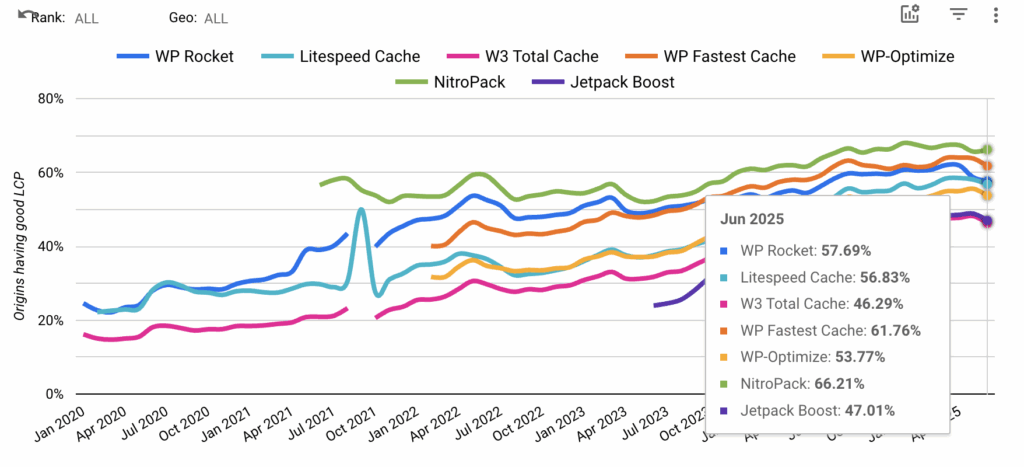
We’re proud to share that NitroPack currently has the highest % of origins passing the Core Web Vitals assessment compared to other speed optimization technologies.
Test NitroPack yourself


By submitting, you agree to the WP Engine Terms of Service and acknowledge the Privacy Policy.
What is The Core Web Vitals Technology Report?
The Core Web Vitals Technology Report, created by Google engineer Rick Viscomi, offers the first official global view of how 2000+ technologies perform in terms of Google’s Core Web Vitals.
The report merges insights from two significant sources: Chrome UX Report (CrUX) and HTTP Archive, which both analyze millions of websites.
CrUX focuses on real-user experiences by tracking how Chrome users interact with websites and summarizing this data into monthly reports through BigQuery and the CrUX API. This allows for evaluating web performance against the Core Web Vitals benchmarks to determine whether websites meet specific user experience standards.
On the other hand, HTTP Archive examines the technical build of web pages. It uses the same set of websites as CrUX, ensuring consistent data for a more comprehensive analysis when the two datasets are combined. Together, these tools offer a robust framework for understanding both the user experience and the technical structure of the web.
You can learn more about the project here.
Simply put, if there’s a single source of information you can trust regarding how a technology/platform performs against Core Web Vitals, this is it!
Why Are Core Web Vitals Important?
Passing Core Web Vitals is directly related to better search rankings, higher traffic, and improved business results.
Apart from looking for pages that provide the most helpful and valuable information for each search query, Google’s core ranking systems look to reward content that provides a good page experience.
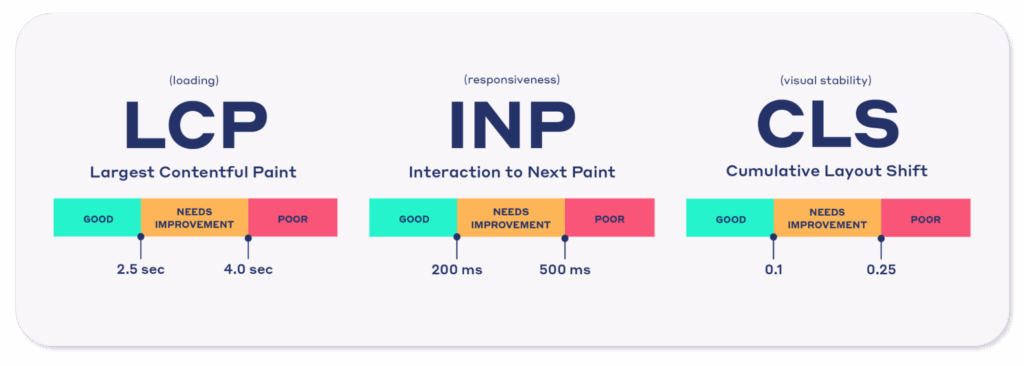
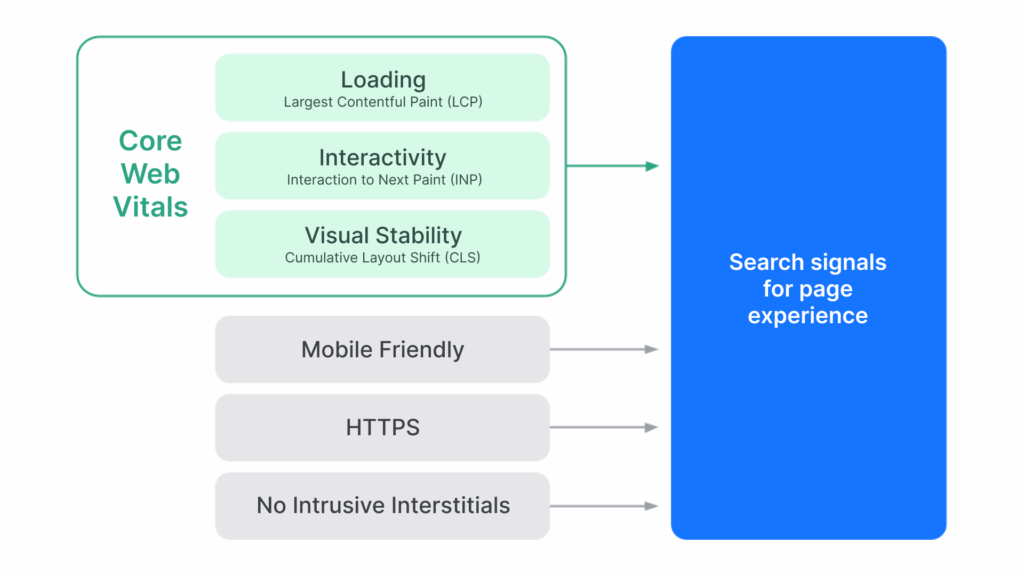
Core Web Vitals is a set of three metrics (LCP, INP, CLS) that measure real-world user experience for loading performance, responsiveness, and visual stability of a page.
Furthermore, they are one of the four page experience search signals that Google takes into consideration when building every search engine results page (SERP).
The other three that you also need to focus on, include:
- Mobile-friendliness: Does your website look good on mobile devices?
- HTTPS: Are your pages served over HTTPS?
- No Intrusive Interstitials: Does your content avoid using an excessive amount of ads that distract from or interfere with the main content?
Beyond their positive SEO impact, it’s proven that passing Core Web Vitals leads to improved business results:
- Rakuten 24: Improving Core Web Vitals led to increased revenue per visitor by 53.37% and conversion rate by 33.13%
- The Economic Times: Passed Core Web Vitals and achieved an overall 43% better bounce rates
- Disney+ Hotstar: Reduced INP by 61% and increased weekly card views by 100%
What Else Can I Compare with The CWV Tech Report?
In addition to comparing the Core Web Vitals as a whole, you can see how your selected technologies/platforms perform against the separate metrics—Largest Contentful Paint (LCP), Cumulative Layout Shift (CLS), Interaction to Next Paint (INP), Time to First Byte (TTFB), and First Contentful Paint (FCP).
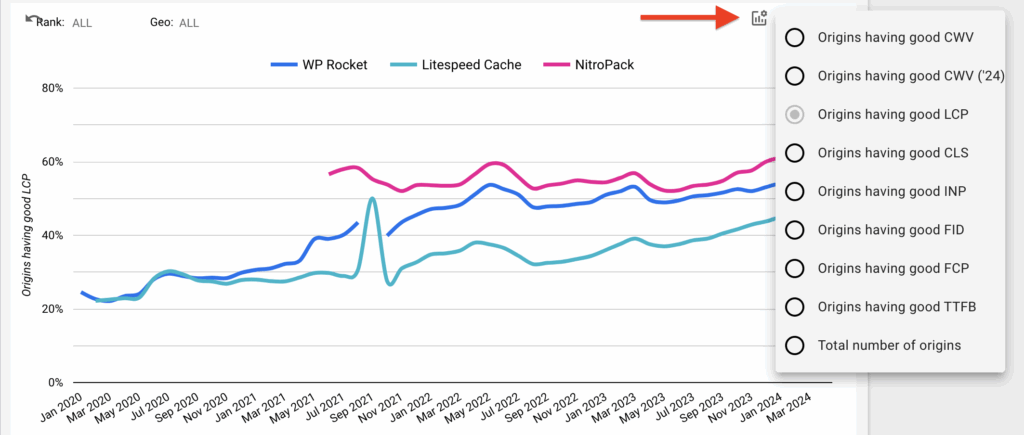
🏆 NitroPack is also a leader in LCP optimization
NitroPack is also the leader in origins with good LCP scores. With only 66.2% (June 2025) of origins having good LCP, the loading metric has been the main culprit and the biggest reason most site owners fail Core Web Vitals.
Besides that, you can also compare data for:
- Median Origin Lighthouse Score
- Median Origin Page Weight
Median Origin Lighthouse (PageSpeed) Scores and real-world performance
The technology report also shows that origins powered by NitroPack have the best Lighthouse scores.
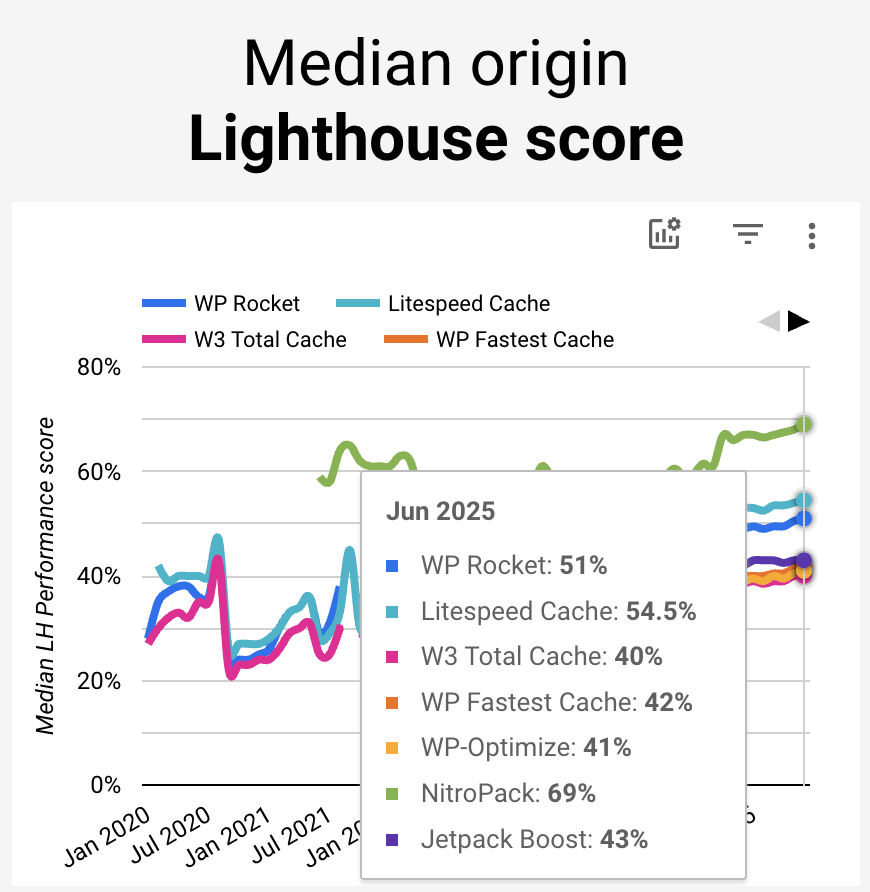
Now, the Lighthouse score is by no means a perfect representation of any website’s performance, although many people use it as a proxy for that.
Put simply, you shouldn’t judge your site’s performance solely based on its Lighthouse (PageSpeed Insights) score.
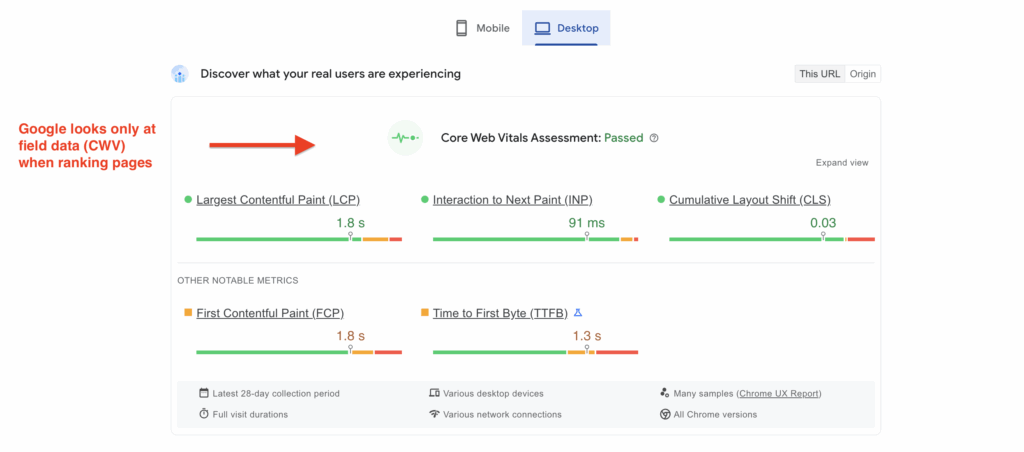
However, green lab results can mean you’re doing many things right. Generally, you can only get good page speed scores by applying best practices like:
- HTML, CSS, and JavaScript minification and compression;
- Reducing the impact of third-party JavaScript;
- Eliminating render-blocking resources;
- Static resource caching;
- Image optimization and more.
These optimizations tend to have a positive impact on lab results and visitors’ experience. That’s why NitroPack applies many best practices (including the ones mentioned above) by default.
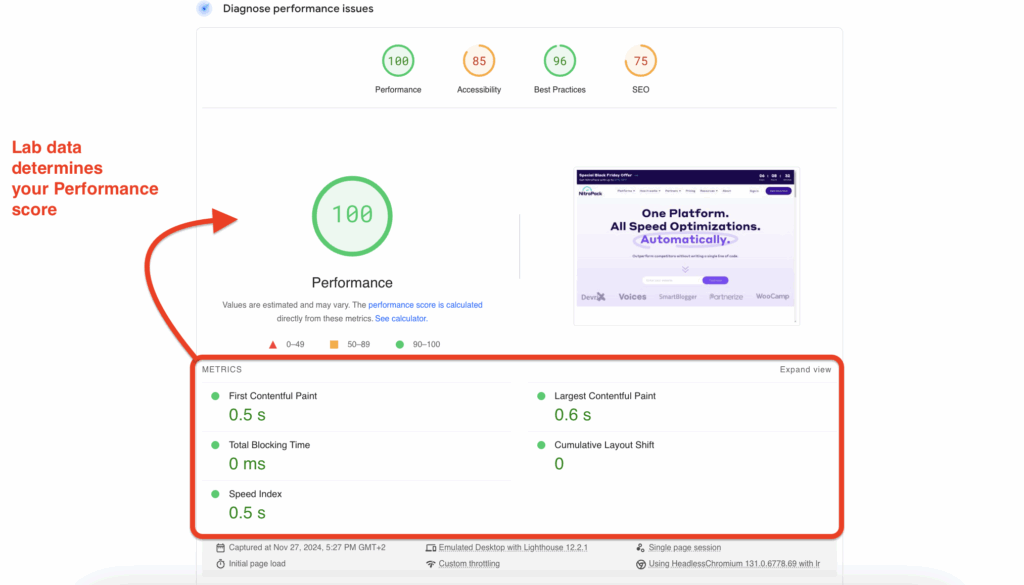
We’ve discussed our essential features extensively in “How NitroPack Works,” so we won’t repeat everything here.
What’s important for now is that implementing these best practices leads to green page speed scores and better experiences for real people, at least for NitroPack-powered websites.
Median Origin Page Weight
An even more critical aspect of the technology report is page weight.
Large pages are among the most significant performance issues on the web. They usually have lots of unoptimized resources, like images, videos, CSS, and JavaScript files. Put simply, the larger a page, the slower it loads on client devices.
We’re thrilled to see that NitroPack also outperforms other speed solutions on this front.
First, here’s the median origin page weight:
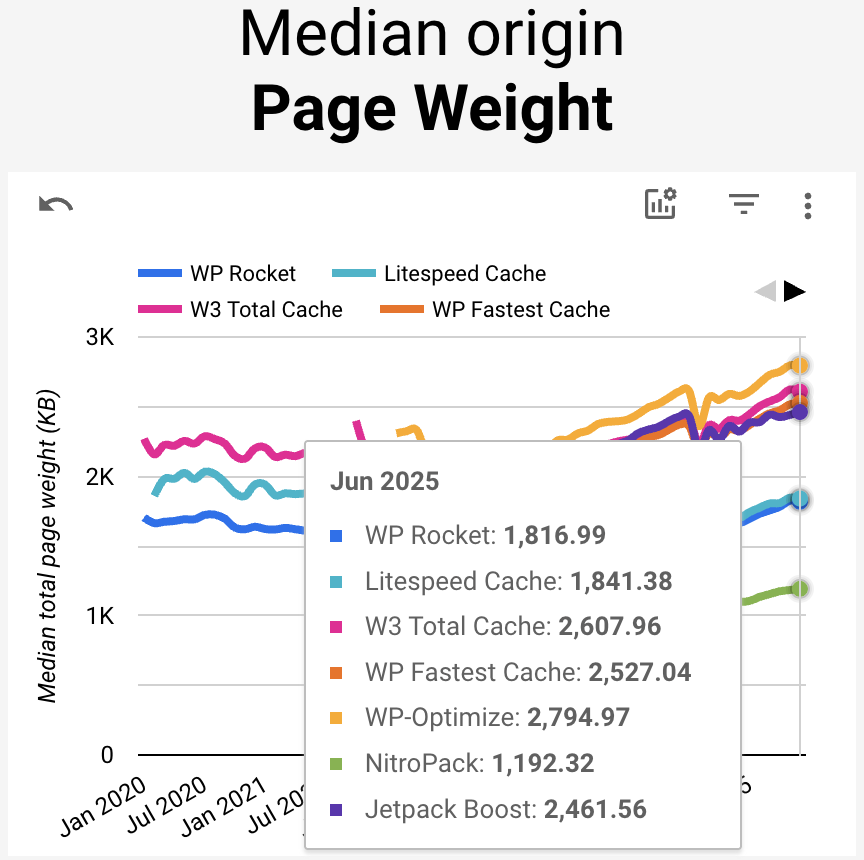
As you can see, origins optimized by NitroPack serve much lighter pages. We achieve these results with features like image optimization, HTML, CSS, and JavaScript minification and compression, and more.
Next, we also need to look at the median image weight per page:
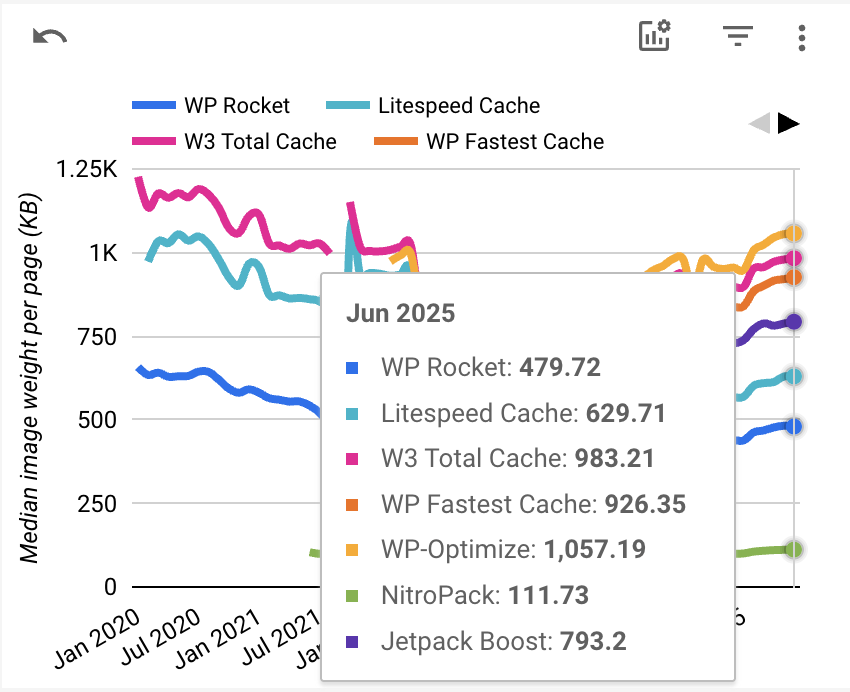
Being the largest element on many pages, images must be compressed, resized, and converted to the right type for optimal performance.
Again, our complete image optimization stack is the primary driver here. More specifically, NitroPack compresses images and converts them to WebP, which reduces their size while preserving good quality. We do this by default, while users can adjust the compression level from the Advanced Settings.
We also use Preemptive Image Sizing, which solves the problem of missing width and height attributes without adding them. This speeds up rendering and reduces layout shifts.
Lastly, image lazy loading plays a massive role in reducing the initial page load time. NitroPack automatically lazy loads all images, including background ones. This mechanism ensures that images are loaded only once users scroll to them.
In short, websites that use NitroPack serve fewer, optimized resources to their visitors, resulting in lower page weight and faster load times.
The optimizations we mentioned here aren’t the only ones that contribute to our results (for example, our advanced caching and built-in CDN are also crucial), so if you want a complete list, check out our Features page.
What We’re Doing for Optimal Core Web Vitals
As good as the data from the Technology Report looks, we must remember that these are simply current results.
Web performance optimization is a never-ending game; hence, we’re constantly working on improving and future-proofing our service for the next big challenge.
Right now, this challenge is called Interaction to Next Paint (INP).
INP officially replaced First Input Delay (FID) as the new responsiveness metric, and immediately after the release 600K websites went from passed to failed Core Web Vitals.
То ensure that none of our customers will be affected, we’ve released two features:
- HTML Lazy Render leverages content-visibility: auto, informing the browser that it can skip rendering and layout calculations for an element until it is needed. This feature allows the browser to optimize the rendering workload and immediately send visual feedback upon a visitor’s action.
- INP Optimizer automatically detects long tasks and optimizes them so the browser’s main thread can be unblocked to process user interactions.
Circling back to the fact that performance optimization is a never-ending process, it’s crucial to note the “near-instant” trend.
Users are no longer satisfied with fast experiences. They are demanding and expecting more from websites. We’re slowly entering the era of instantaneous browsing.
FAQ
Are Core Web Vitals still relevant?
Yes, Core Web Vitals are still highly relevant as they remain essential metrics used by Google to evaluate the user experience of web pages. These metrics focus on critical aspects like loading performance, interactivity, and visual stability, which are crucial for ensuring a positive user experience. As part of the broader Page Experience update, they help webmasters and site owners prioritize improvements that directly impact user satisfaction and engagement.
What does failing Core Web Vitals mean?
Failing Core Web Vitals means a web page does not meet Google’s performance benchmarks for delivering a good user experience. Specifically, it indicates issues with slow loading times (LCP), poor responsiveness (INP), and unstable visual content (CLS). These failures can lead to higher bounce rates and lower user satisfaction, negatively affecting a website’s overall performance, search rankings, and conversions.
What is a good Core Web Vitals score?
A good Core Web Vitals score includes an LCP under 2.5 seconds, an INP of less than 200 milliseconds, and a CLS score of less than 0.1.
Are Core Web Vitals important for SEO?
Yes, Core Web Vitals are crucial for SEO as they are incorporated into Google’s page experience signals, which influence search rankings. Websites that perform well on these metrics are more likely to rank higher in search results because they provide a better user experience. This emphasis on user experience means that optimizing for Core Web Vitals can lead to improved visibility, increased traffic, and better engagement metrics.
How does HTTP Archive’s Core Web Vitals Technology Report generate its data?
The Core Web Vitals Technology Report generates its data by analyzing millions of websites using real user data from the Chrome User Experience Report (CrUX) and HTTP Archive. This data collection involves measuring performance and user experience metrics from actual users’ interactions with websites. By aggregating and analyzing this data, the report provides insights into how different technologies and practices impact web performance across a wide range of sites.