
TL;DR
Video Facades delay the loading of heavy video embeds by showing a static thumbnail preview instead. The actual video only loads when a user clicks to play—saving bandwidth, reducing render time, and significantly improving LCP and performance on video-heavy pages.
Autoplay YouTube or Vimeo embeds look great—but they’re heavy. Every embedded video brings:
- Multiple network requests
- JavaScript and tracking scripts
- Hidden layout shifts
Even one embedded video can tank your LCP score, increase Time to Interactive, and inflate page weight by megabytes. Multiply that across blog posts, product pages, or landing pages, and performance suffers fast.
That’s where Video Facades come in—a smart way to keep your videos visually present without loading them until users hit play. Read on to learn everything about this new feature by NitroPack to speed up your WordPress site.
What Are Video Facades?
Video Facades replace embedded video players with lightweight thumbnail previews that look identical to the real thing. But here’s the difference:
- The video doesn’t load until the user clicks.
- No tracking scripts, no iframes, no autoplay overhead.
- Just a static image that loads instantly—then fetches the embed only when needed.
It’s the best of both worlds—videos still look integrated and function perfectly, users enjoy fast load times, and your LCP and TTI scores improve drastically.
Test NitroPack yourself


By submitting, you agree to our Privacy Policy.
With vs Without Video Facades (Example)
Loading full video players on page load is heavy and unnecessary—especially when users may never hit play.
Replacing them with lightweight preview images (facades) speeds up loading, cuts down on JavaScript execution, and significantly improves LCP and mobile responsiveness.
| Scenario | Without Video Facades | With Video Facades |
| YouTube embed in hero section | Loads iframe, JS, and third-party scripts on first paint | Static thumbnail shown instantly, iframe deferred |
| Product demo video below the fold | Preloads entire video even if never watched | Loads only if clicked |
| Blog post with 3+ video embeds | Each video adds >500KB and layout shifts | Only images loaded initially, reducing LCP and CLS |
| Mobile performance | Embedded video hurts FCP, LCP, and drains mobile data | Thumbnail loads instantly, no tracking scripts until interaction |
Why Are Video Facades Important?
If your site relies on embedded videos—especially from third-party platforms like YouTube or Vimeo—you’re almost certainly paying a performance penalty.
Here’s what you gain with Video Facades:
- Improved LCP: Only lightweight images load initially, drastically improving first contentful paint
- Faster TTI (Time to Interactive): No autoplay video scripts or media buffering during page load
- Reduced JS execution: No video player code is parsed unless activated
- Lower bandwidth use: Especially useful on mobile or slow networks
- Better Core Web Vitals: Less layout shift and faster visual rendering
In performance audits (like Lighthouse or PageSpeed Insights), this helps you eliminate warnings like:
- Avoid enormous network payloads
- Reduce unused JavaScript
Video Facades in NitroPack Explained
Enabling Video Facades replaces heavy <iframe> embeds with thumbnail facades that mimic the real thing visually—but don’t load any of the actual video content until clicked.
Here’s how NitroPack handles it:
- Detects video embeds
NitroPack scans your page during optimization and identifies video players from platforms like YouTube and Vimeo. - Replaces with thumbnails
It fetches and displays the video’s preview image (poster frame), styled like a standard video player. - Lazy-loads video on interaction
When the user clicks “Play,” NitroPack dynamically loads the embed and starts the video.
| Use Case | Why Video Facades Help |
| Landing pages with autoplay videos | Prevents autoplay + scripts from delaying load and interaction |
| Long-form blog posts | Keeps pages lightweight by only loading videos on demand |
| Ecommerce pages with video demos | Maintains visual polish without sacrificing speed |
| Mobile-first performance goals | Reduces total payload and preserves bandwidth |
NitroPack vs Manually Lazy-Loading Videos
You can implement video lazy loading with JavaScript hacks or plugins. But it’s complex, often buggy, and may not work across all embed types or responsive layouts.
With NitroPack, however, you get both Lazy Loading and Video Facades for a powerful video optimization stack.
| Feature | Manual Lazy Loading | NitroPack Video Facades |
| Requires custom JS or plugins | ✅ Yes | ❌ Fully built-in |
| Automatically detects video embeds | ⚠️ Limited scope | ✅ Covers YouTube + Vimeo |
| Works across all breakpoints | ⚠️ Needs extra config | ✅ Responsive by default |
| Load-on-click functionality | ⚠️ May break styling | ✅ Seamless, native UX |
How to Enable Video Facades in NitroPack
Enabling Video Facades is simple:
- Log in to your NitroPack Dashboard
- Go to Cache Settings >> Images & Media
- Enable Video Facades
- Select the desired dimensions for your video container
- Save to apply changes
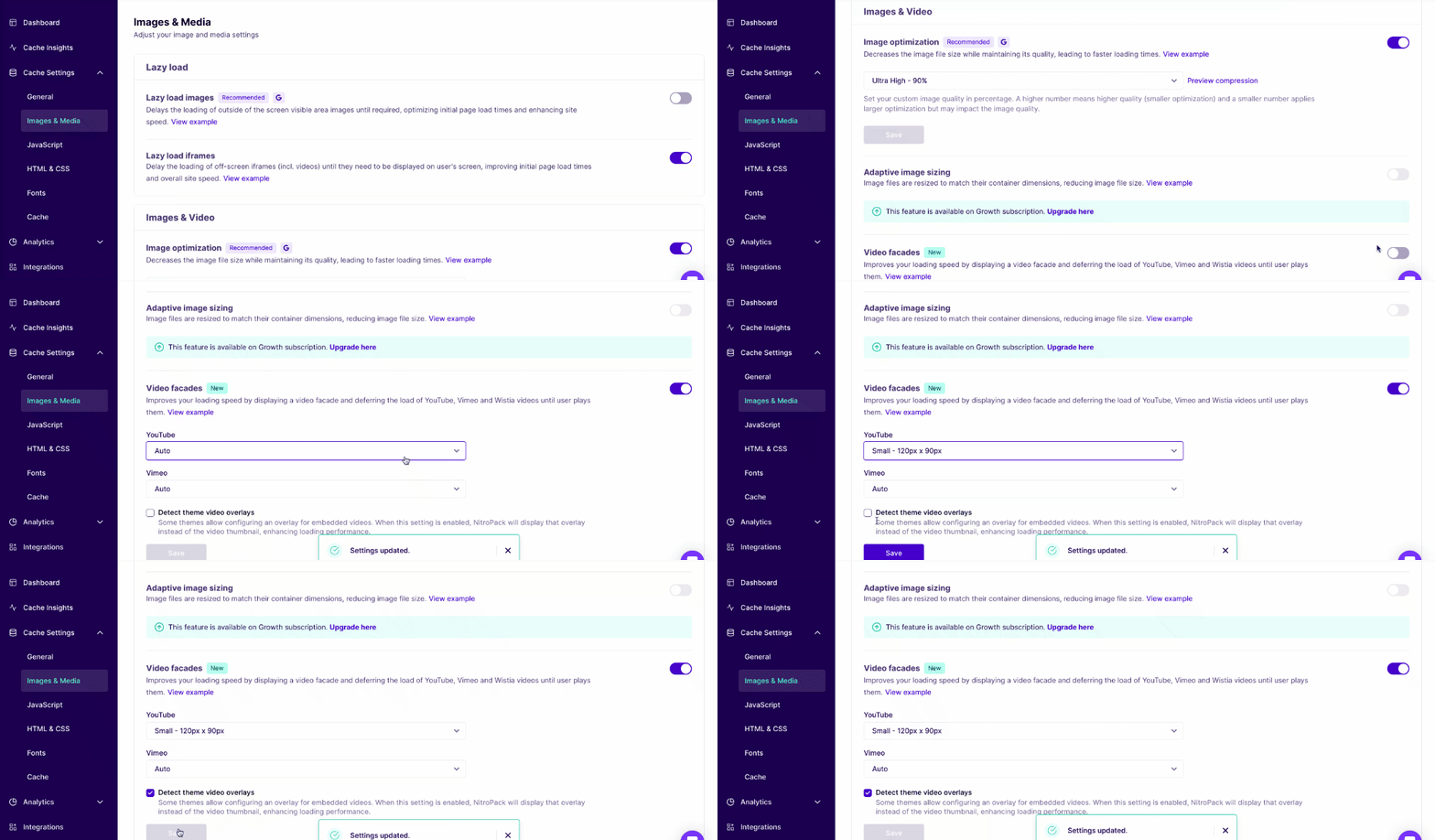
That’s it. NitroPack will now replace heavy video players with lightning-fast preview facades—automatically.
Need more help? Check out our Video Facades guide.
FAQs
Does this work with all video platforms?
Currently, NitroPack supports YouTube and Vimeo embeds. Support for more platforms is on the roadmap.
Can I customize how the preview thumbnail looks?
Thumbnails are fetched automatically from the video’s platform. You can override styles via CSS if needed.
Will this affect video SEO or accessibility?
No. NitroPack uses semantic HTML with proper attributes, so your video content remains indexable and accessible after interaction.
Does NitroPack host the videos?
No. Video Facades only affect the embedding behavior. The video itself remains hosted on its original platform (e.g., YouTube).
Is autoplay still possible?
Autoplay is disabled by default for performance reasons. Once a user clicks play, the original autoplay setting from the embed may apply.