TL;DR
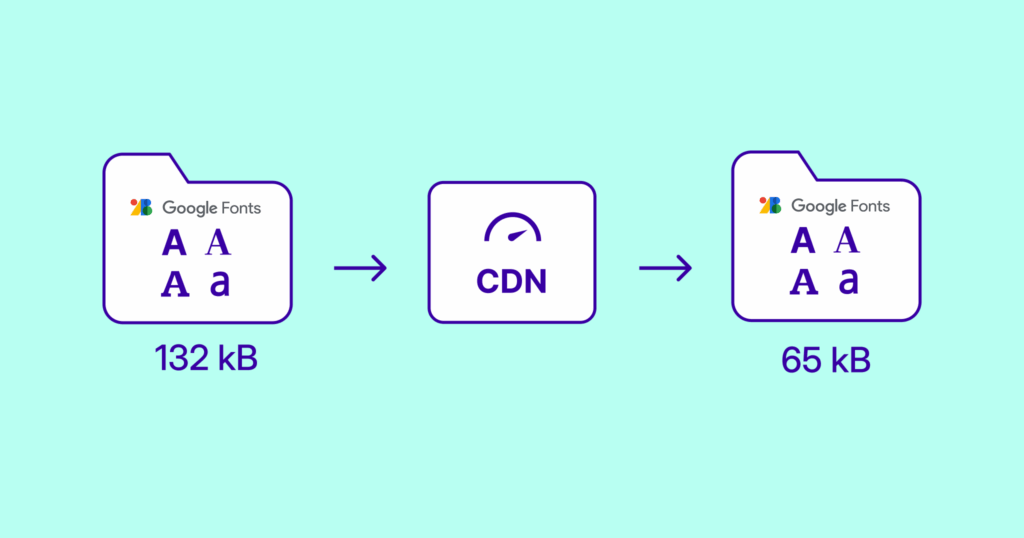
The popular Google Fonts are render-blocking and loaded from external domains by default. NitroPack automatically downloads, hosts, and optimizes these fonts locally to speed up rendering, eliminate unnecessary requests, and boost your Core Web Vitals.
Google Fonts is the go-to source for clean, readable, and stylish fonts. But there’s a catch: Google Fonts, when loaded externally, can slow down your site.
Here’s what typically happens:
- Fonts are loaded from Google’s CDN
- External requests delay rendering
- Multiple variants and weights are often loaded unnecessarily
- Performance issues like FOIT (Flash of Invisible Text) and CLS (Cumulative Layout Shift) arise
NitroPack’s Google Fonts Optimization changes all of that. Read on to learn more about Google fonts optimization and how NitroPack automates this for a faster WordPress site.
What Is Google Fonts Optimization?
Google Fonts Optimization is the process of self-hosting and serving fonts from your own domain, rather than fetching them from fonts.googleapis.com or fonts.gstatic.com.
Optimizing Google fonts with WordPress speed plugins like NitroPack means:
- Fonts are automatically downloaded and hosted locally
- Only the fonts and weights used are loaded
- Font display is set to swap to ensure visible text during load
- Preload and font-display strategies are applied automatically
Benefits include:
- Faster text rendering
- Reduced DNS lookups and fewer HTTP requests
- Enhanced Core Web Vitals (especially LCP and CLS)
- Increased privacy and GDPR compliance (no external requests to Google)
Test NitroPack yourself


By submitting, you agree to our Privacy Policy.
With vs Without Google Fonts Optimization (Example)
Without optimization, sites typically load Google Fonts directly from Google’s CDN. This results in third-party requests that delay rendering, especially if multiple weights and variants are used.
With NitroPack, fonts are downloaded, optimized, and served directly from your own server—ensuring faster loading and better user experience.
| Scenario | Without Optimization | With Google Fonts Optimization |
| Font source | fonts.googleapis.com / fonts.gstatic.com | Your own domain |
| DNS lookups | Required for Google’s CDN | None (local delivery) |
| File size | Often includes unused styles or weights | Only required fonts are included |
| Font loading behavior | Default (block or auto) | swap for visible text |
| FOUT (Flash of Unstyled Text) | More likely | Significantly reduced |
| GDPR concerns | Possible issues from external requests | Fonts hosted locally – no external tracking |
Why Is Google Fonts Optimization Important?
Google Fonts are widely used, but they’re also one of the most common sources of unnecessary network requests and render delays.
Here’s why optimization matters:
- Improved Load Speed: Self-hosted fonts are delivered faster than those fetched from an external domain.
- Better Rendering: Applying font-display: swap ensures visible text during font load, eliminating FOIT.
- Reduced HTTP Requests: Hosting fonts locally removes extra DNS lookups and connections.
- Greater Control: You serve only what you need, nothing more.
- Improved Core Web Vitals: LCP and CLS metrics improve with faster and more stable font rendering.
- GDPR Compliance: Hosting fonts locally means no user data is shared with Google Fonts servers.
Additionally, Google fonts optimization helps resolve Google PageSpeed warnings like:
- Avoid multiple page redirects – Loading fonts locally avoids redirects from Google’s CDN.
- Ensure text remains visible during webfont load – NitroPack sets font-display: swap by default.
- Preconnect to required origins – NitroPack eliminates this by serving fonts from the same origin.
- Serve static assets with an efficient cache policy – Fonts hosted locally can be cached efficiently.
- Reduce the impact of third-party code – NitroPack removes the need for Google-hosted font scripts.
Google Fonts Optimization in NitroPack Explained
When you enable Google Fonts Optimization in NitroPack:
- NitroPack detects all Google Fonts being used on your site
- Downloads them to our own server
- Strips unused styles and weight
- Applies efficient caching and compression
- Serves them with font-display: swap for immediate visibility
- Automatically preloads fonts to reduce delays
Everything happens behind the scenes—no manual edits or coding required.
| Use Case | Recommended Action |
| Site using multiple Google Fonts | Enable Optimization |
| Pages with several font weights or styles | Enable Optimization |
| Privacy-conscious or GDPR-compliant sites | Enable Optimization |
| Fonts loaded through Elementor or themes | Enable Optimization |
NitroPack vs Manual Google Fonts Optimization
Manually optimizing Google Fonts requires downloading font files, converting them to modern formats, updating CSS, and applying preload headers—not to mention maintaining everything during theme or plugin updates.
NitroPack automates the entire process in one click.
| Feature | Manual Setup | NitroPack Automation |
| Self-hosts Google Fonts | ⚠️ Requires manual download + CSS | ✅ Automatically |
| Applies font-display: swap | ❌ Often forgotten | ✅ Enabled by default |
| Removes unused font weights | ⚠️ Manually edited | ✅ Only used weights included |
| Preloads fonts | ❌ Requires setup | ✅ Applied automatically |
How to Optimize Google Fonts in NitroPack
Getting started is simple:
- Log in to your NitroPack dashboard
- Navigate to Cache Settings >> Fonts
- Enable Optimize Google hosted fonts

That’s it. NitroPack will download, host, and optimize your fonts automatically.
Need more help? Check out our Google Fonts Optimization guide.
FAQs
Will my site’s design change after optimizing fonts?
No—NitroPack keeps the same fonts, styles, and appearance. It only changes how they’re delivered.
What if I use multiple Google Fonts or weights?
NitroPack detects all fonts in use and includes only what’s needed—avoiding bloat from unused styles.
Is this compatible with my theme or page builder?
Yes. NitroPack works with most WordPress themes and page builders, including Elementor, Divi, and WPBakery.
Does this help with GDPR?
Yes. By hosting fonts locally, NitroPack eliminates calls to Google’s servers, which can help improve GDPR compliance.