

TL;DR
NitroPack’s LCP Preload feature identifies the Largest Contentful Paint (LCP) element on your page—such as a hero image or background banner—and preloads it automatically. This ensures the most important element loads faster, improving Core Web Vitals and reducing PageSpeed Insights warnings without manual setup.
The first thing users want to see on a page is its main content—like the hero image, heading, or headline banner.
Unfortunately, browsers don’t always prioritize these large elements. They may load smaller assets first, leaving users waiting for the most important content to appear.
When this happens, it negatively impacts a crucial metric like Largest Contentful Paint (LCP).
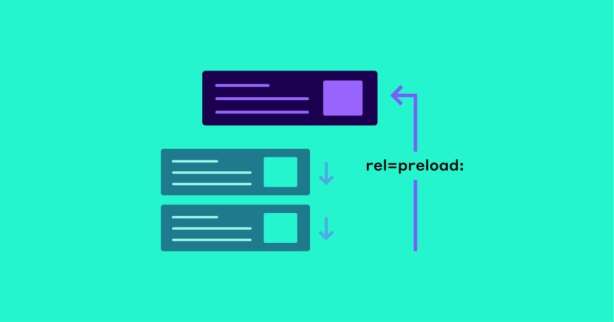
One way to fix this and get a faster WordPress website? Prioritize loading the LCP element by preloading it.
Test NitroPack yourself


By submitting, you agree to our Privacy Policy.
What Does “LCP Preload” Mean?
LCP Preload is a performance optimization that tells the browser to fetch the most important visual element on the page early—before lower-priority assets like scripts or styles.
For example, instead of waiting to discover:
- hero-image.jpg
- banner-background.png
NitroPack automatically preloads these LCP elements so they’re fetched and displayed as soon as possible.
Simply put, LCP Preload means your visitors see the main content faster, improving perceived speed and overall experience.
Test your site speed with LCP Preload by NitroPack for free
By submitting, you agree to our Privacy Policy.
With vs Without LCP Preload (Example)
Without LCP Preload, browsers load the main image or banner later in the chain, often after scripts or smaller assets. This delays when users see the most important content.
With LCP Preload, NitroPack ensures the LCP element is prioritized and loaded earlier, making the page feel significantly faster.
| Scenario | Without LCP Preload | With LCP Preload |
|---|---|---|
| LCP element loading | Delayed until discovered | Preloaded early |
| User perception | Blank space before content appears | Main content visible quickly |
| Core Web Vitals | Poor LCP, slower FCP | Faster LCP, improved FCP |
| Mobile experience | Noticeable delays | Smoother, faster visuals |
Why Is LCP Preload Important?
Browsers don’t always prioritize the largest or most important visual element by default. This means visitors wait longer to see what matters most.
NitroPack’s LCP Preload solves this by:
- Improving visual readiness. Ensures users see the largest element as soon as possible.
- Boosting Core Web Vitals. Directly improves LCP and FCP, making pages feel faster and more engaging.
- Reducing bounce rates. A faster first impression means users are less likely to leave.
Bonus: Helps Resolve Common PageSpeed Insights Warnings
Delayed LCP often triggers PSI issues like:
- Preload key requests
- Reduce initial server response time
- Ensure text remains visible during webfont load
By automatically preloading the LCP element, NitroPack helps clear these warnings and improves scores.
How NitroPack’s LCP Preload Works
Manually identifying and preloading the LCP element requires technical expertise and ongoing adjustments. NitroPack automates the process entirely.
It automatically:
- Analyzes the page to detect the true LCP element
- Inserts a preload directive so the browser fetches it first
- Ensures the preload respects load order and dependencies
- Delivers it via CDN, optimized and compressed for speed
The result: your most important visual content always loads faster—without manual tweaks.
NitroPack vs Manual LCP Preloading
Manual preloading can be error-prone, requiring developer knowledge and regular updates whenever content changes. NitroPack removes that burden with automation.
| Feature | Manual LCP Preloading | NitroPack LCP Preload |
|---|---|---|
| Setup required | Manual coding per page | Fully automatic |
| Accuracy | Risk of missing the true LCP | Automatically detected |
| Maintenance | Must update with design/content changes | Set it and forget it |
| CDN delivery | Requires extra setup | Built-in |
How to Enable LCP Preload in NitroPack
Enabling this feature is simple:
- Log into your NitroPack dashboard.
- Navigate to Cache Settings >> Images.
- Toggle on LCP Preload.
From there, NitroPack will automatically detect and preload the largest element on each page.
FAQs
Does LCP Preload work with background images and banners?
Yes. NitroPack can detect different types of LCP elements, including images, background images, and hero banners.
What if my page has multiple large images—how does NitroPack pick the right one?
NitroPack automatically detects the element contributing most to LCP, based on real-world rendering, and preloads that.
Can LCP Preload improve mobile LCP specifically?
Yes. Mobile devices benefit most from LCP Preload because limited processing power makes delayed large images more noticeable.
Does this feature work with background images set in CSS?
Yes. NitroPack can detect LCP elements whether they’re inline images, CSS backgrounds, or video poster frames.
Will LCP Preload increase bandwidth usage?
No. It simply changes the loading priority—it doesn’t add extra requests.

