
TL;DR
Some WordPress themes inject hidden video overlays or placeholders that load even when videos aren’t visible—wasting resources and hurting Core Web Vitals. NitroPack automatically detects and disables these overlays before they load, eliminating layout shifts and improving LCP without breaking video functionality.
Popular WordPress themes include autoplay background videos, modal video players, or hidden video placeholders on page load. These elements often:
- Load iframe embeds and scripts unnecessarily
- Trigger unwanted layout shifts (CLS)
- Increase initial load time and delay LCP
Worse, you may not even know it’s happening—because the video never visibly appears until a user interacts.
That’s where Detect Theme Video Overlays comes in: a smart way to neutralize invisible or offscreen video elements to speed up your WordPress site.
What Is Detect Theme Video Overlays?
It’s a behind-the-scenes optimization that scans for video elements injected by WordPress themes and page builders—especially those hidden behind modals, accordions, or display:none rules.
Here’s what it does:
- Detects hidden video placeholders or overlays before they’re rendered
- Prevents loading of heavy third-party video scripts when not needed
- Eliminates layout shifts caused by video player injection
- Preserves video functionality when users engage
Test NitroPack yourself


By submitting, you agree to our Privacy Policy.
With vs Without Detect Theme Video Overlays (Example)
Detect Theme Video Overlays ensures that background or hidden video embeds—often placed behind hero sections, buttons, or custom design elements—don’t load unless they’re truly visible or interactive.
Without this detection, even videos layered behind static overlays (like a play button or image) will still load in full, consuming bandwidth and delaying LCP.
With it enabled, those iframes are held back until a user actively triggers them, leading to faster initial renders, lower page weight, and smoother interactivity—especially on media-rich landing pages.
| Scenario | Without Detection | With Detection |
| Homepage with hidden modal video | Video iframe preloads, adds layout shift, delays first paint | Video is skipped during load, layout is stable |
| Accordion block with video preview inside | Video scripts load even when hidden inside collapsed section | NitroPack suppresses it until accordion is opened |
| Hero section with background video fallback | Theme loads fallback iframe even when not in viewport | Only loads if visible and required |
| Multiple product pages with inactive videos | Hundreds of unnecessary requests, scripts, and player elements | Pages load only the essentials—videos only render when needed |
Why Detecting Theme Video Overlays Matters
When you embed videos intentionally, you expect performance trade-offs. But when hidden theme logic loads video players without your knowledge, you’re losing performance for no good reason.
With this feature by NitroPack, you can automatically:
- Fix layout shifts from unexpected iframe rendering
- Reduce third-party script execution on page load
- Improve LCP and FCP by skipping unused video players
- Preserve user experience by keeping video interactivity intact
- Target specific theme quirks without breaking site functionality
In Lighthouse or PSI reports, this resolves:
- Avoid large layout shifts
- Reduce unused JavaScript
- Minimize third-party usage
How does NitroPack’s Detect Theme Video Overlays Work?
This feature is fully integrated into NitroPack’s optimization engine. When enabled:
- NitroPack scans page HTML and layout during optimization: It looks for common video player patterns from themes and builders like Elementor, WPBakery, Divi, and custom shortcodes.
- It checks for visibility status and contextual rendering: If the video is hidden (e.g., inside modals or display:none containers), NitroPack prevents the video from loading initially.
- Video loads only on user interaction: When the modal or section becomes visible, NitroPack dynamically re-enables the video embed as intended.
You keep full functionality—without loading unnecessary scripts or risking layout instability.
| Use Case | Why This Feature Helps |
| Page builders with video popups | Prevents hidden video scripts from loading on page render |
| Product pages using lightbox video demos | Keeps video offscreen until requested by user |
| Blogs with expandable video sections | Avoids layout shifts from hidden videos being preloaded |
| Any theme with background video fallbacks | Skips video player rendering unless absolutely needed |
NitroPack vs Manual Video Cleanup
Fixing hidden video loads manually requires editing theme code or injecting complex conditional logic—risky, time-consuming, and error-prone.
| Feature | Manual Fix | NitroPack Detection |
| Works across themes and page builders | ❌ Requires manual case-by-case tweaks | ✅ One-click solution |
| Detects hidden video logic | ⚠️ Complex JS conditionals | ✅ Built-in detection engine |
| Prevents layout shifts on load | ⚠️ Requires trial & error | ✅ Fully automatic |
| Keeps interactivity intact | ⚠️ Easy to break behavior | ✅ Preserves full functionality |
How to Enable Detect Theme Video Overlays in NitroPack
To turn it on:
- Log into your NitroPack Dashboard
- Go to Cache Settings >> Images & Media
- Enable Video Facades
- Select “Detect Theme Video Overlays”
- Save to apply changes
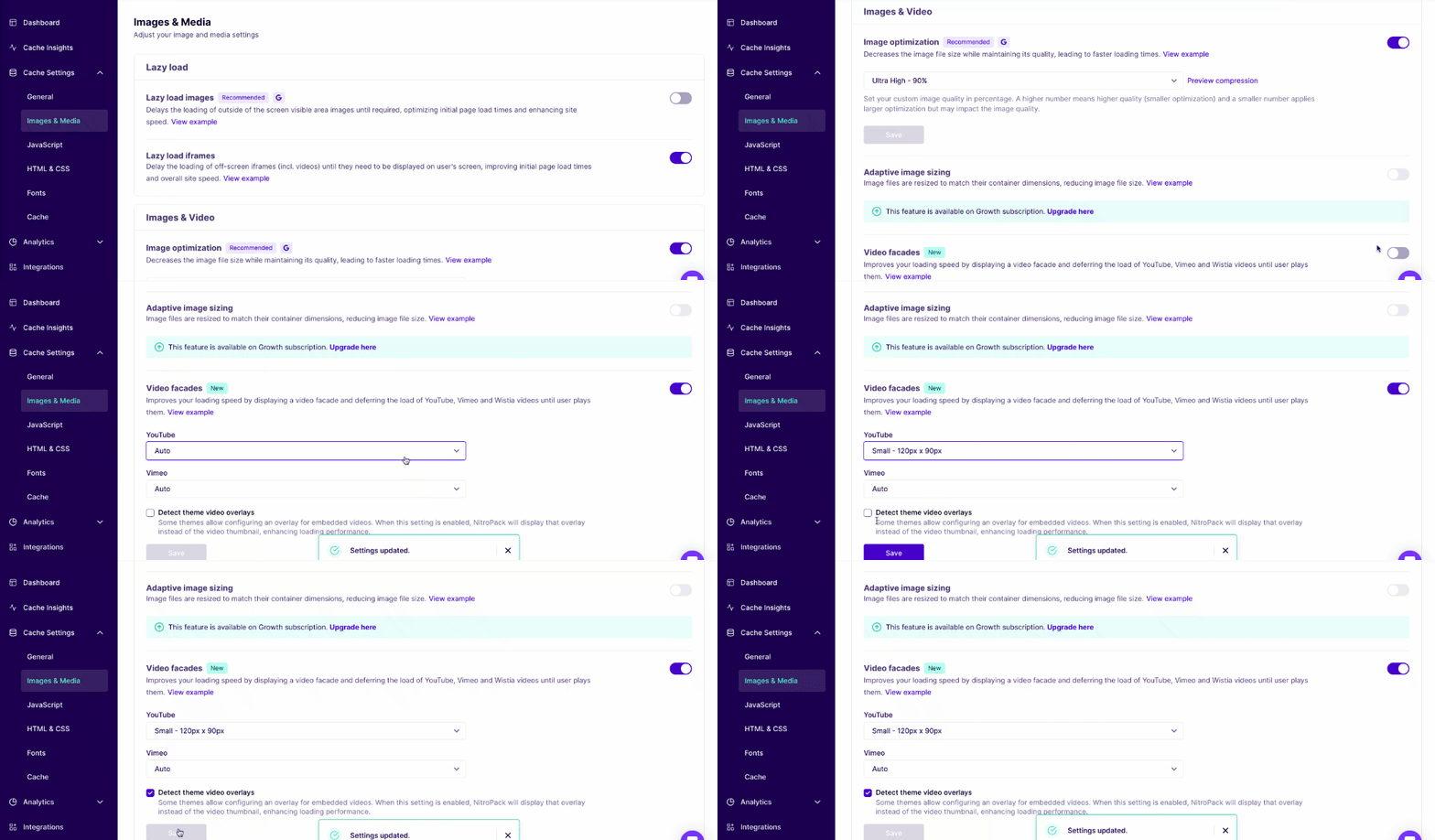
From that moment on, NitroPack will intelligently manage theme-based video elements—without extra work on your end.
Need more help? Check out our Detect Theme Video Overlays guide.
FAQs
What themes or builders does this feature support?
Detect Theme Video Overlays works across common WordPress themes and popular builders like Elementor, WPBakery, Divi, and more. Custom themes are also supported as long as standard video embed patterns are used.
Will this block all video loading?
No—videos still load and play normally when users engage with them. NitroPack simply prevents unnecessary preloading of hidden embeds.
Can I customize which videos get suppressed?
This feature works automatically based on visibility detection. If you need manual control, NitroPack’s support team can help with exclusions or custom rules.
Does it break video modals or popups?
No. NitroPack only defers loading hidden video embeds. Once the modal or section becomes visible, the video functions normally.
How does this help Core Web Vitals?
It reduces layout shifts (CLS), improves Largest Contentful Paint (LCP), and prevents excess JavaScript execution—key for improving your PageSpeed scores.