

TL;DR
NitroPack’s built-in CDN includes a global edge network, HTTP/3, Brotli compression, edge caching, and advanced failover logic to ensure speed, reliability, and Core Web Vitals improvements for your WordPress websites. 112 was released at the beginning of April, and from all new updates, one, in particular, caught our attention:
You can have a perfectly optimized website, minified code, compressed images, and lazy-loaded scripts, but still deliver a slow experience to visitors in another country.
Why?
Because speed isn’t just about how well your site is built. It’s also about where it’s delivered from.
That’s where a CDN (Content Delivery Network) comes in. Read on to learn how NitroPack’s CDN empowers fast content delivery for an even faster WordPress site.
What Is a CDN and How Does It Help?
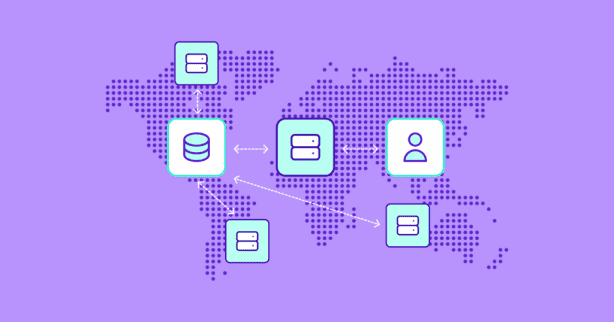
At its core, a CDN is a network of servers strategically located around the world. Instead of serving your site from a single origin (like your main server), a CDN caches and delivers content—like images, scripts, stylesheets, and even entire HTML pages—from servers that are physically closer to your users.

Here’s what that means in practice:
- Faster load times, because distance is reduced
- Lower latency, as requests don’t have to travel halfway across the world
- Reduced bandwidth load on your hosting provider
- Improved reliability, even during traffic spikes or outages
When someone in Tokyo visits your site hosted in Frankfurt, a CDN ensures they’re not waiting for the entire round trip—they get content from a nearby server instead.

Test NitroPack yourself

Why Use a CDN
At first, a CDN might feel like a behind-the-scenes technical upgrade. However, in reality, it has visible, measurable effects on how fast and responsive your site feels to visitors.
We’ve already mentioned them, but let’s dig a little deeper. Here’s what leveraging a CDN actually means to your site’s and business’ performance:
Faster Content Delivery, Everywhere
When you serve content from a single server, your site speed depends heavily on where your visitors are located. Someone in the same region as your server might enjoy a quick load time, but a visitor from another continent may face frustrating delays.
A CDN solves this by distributing your content across a global network of edge servers. When someone visits your site, the CDN serves them content from the nearest server—not the origin. This proximity reduces round-trip time and helps speed up key visual milestones like:
- First Contentful Paint (FCP) – when the first text or image appears
- Largest Contentful Paint (LCP) – when the main content (like a banner or hero section) finishes rendering
Lower Latency and Improved Responsiveness
Modern websites rely heavily on JavaScript, fonts, stylesheets, and third-party tools—all of which need to be downloaded and executed by the browser. If those assets are stored far away, every request takes longer and piles pressure on the browser’s main thread.
CDNs reduce this latency by bringing files closer to users. That helps improve performance indicators like:
- Interaction to Next Paint (INP) – how quickly a page responds after a user interacts
- Total Blocking Time (TBT) – how long scripts delay browser responsiveness
The shorter the delay between input and response, the more responsive your site feels—especially on mobile devices and slower networks.
Reduced Load on Your Origin Server
When a CDN handles the majority of requests—especially for static files like images, CSS, and JS—your main server has less to do. This leads to:
- Fewer crashes during traffic surges
- More efficient use of resources
- Faster backend performance for database-driven operations
- Easier scaling and better overall stability
Think of it as moving heavy lifting off your shoulders, so your server can focus on what matters: generating content and serving dynamic functionality.
Bonus: CDNs Help Resolve Common PageSpeed Insights Warnings
A good CDN doesn’t just make your site faster, it helps eliminate issues that often appear in PageSpeed Insights or Lighthouse reports.
For example, a CDN can help with:
- Serve static assets with an efficient cache policy
- Reduce server response times (TTFB)
- Enable text compression
Addressing these warnings not only boosts your performance scores, it also improves SEO, conversion rates, and the experience visitors have with your site from the very first click.
How NitroPack’s Built-In CDN Works
NitroPack doesn’t require you to connect a third-party CDN or configure a single setting.
Once installed, NitroPack automatically distributes your optimized assets—HTML, CSS, JS, images, fonts—across a global edge network, powered by Cloudflare.
Here’s what you get with every single NitroPack plan and what’s actually happening under the hood:
Global Edge Distribution
NitroPack leverages a CDN infrastructure that spans 300+ cities across more than 100 countries. When a visitor requests your site, NitroPack serves the response from the edge location closest to them—cutting down physical distance and accelerating delivery.
Edge Caching of Optimized Assets
All optimized files—minified JavaScript, compressed CSS, responsive images, lazy-loaded assets—are cached at the edge, so your origin server isn’t hit again and again. This is crucial for repeat visits and high-traffic periods.
Seamless Integration with NitroPack’s Optimization Stack
NitroPack’s CDN isn’t just about delivery—it’s tightly integrated with all of NitroPack’s optimization layers. This means:
- Optimized images are served through the CDN
- Lazy-loaded content is handled more efficiently
- Minified and deferred assets are already cached and ready to serve
Automatic Compression (Brotli & GZIP)
To reduce payload size during transfer, NitroPack automatically serves files using Brotli (preferred) or GZIP compression, depending on the browser’s capabilities. This ensures even large scripts or stylesheets reach your visitors faster.
HTTP/3 Support
NitroPack supports HTTP/3, the latest evolution of the web’s transport protocol. HTTP/3 improves speed and security by reducing connection overhead, especially on slow or unstable networks. This results in faster Time to First Byte (TTFB) and smoother performance on mobile.
NitroPack vs Traditional WordPress Speed Tools
| Feature | NitroPack | Traditional Tools |
| CDN included | Built-in global CDN with edge caching | Usually paid separately (e.g., Cloudflare Pro, BunnyCDN) |
| CDN setup required | None—enabled by default | Manual integration and configuration needed |
| Asset optimization | Automatically optimized and cached at edge | Requires additional plugins for minification, compression, etc. |
| Performance impact | Seamless, stack-wide improvements | Fragmented—depends on multiple tools working together |
| Total cost | Single subscription | Often higher when stacking tools and CDNs |
FAQs
Do I need a Cloudflare account?
No. NitroPack manages everything through its own CDN integration. You don’t need to connect or configure anything.
Can I use NitroPack’s CDN alongside another one?
In most cases, NitroPack’s CDN will replace the need for an external provider. But it can coexist if you’re managing images or videos on another domain.
Is the CDN included in all NitroPack plans?
Yes. CDN access is built into all NitroPack plans, including the Free plan.

